Key Specifications
INAIR
5.0
2 reviewsBuy at Amazon Prime Delivery • 30-Day Returns
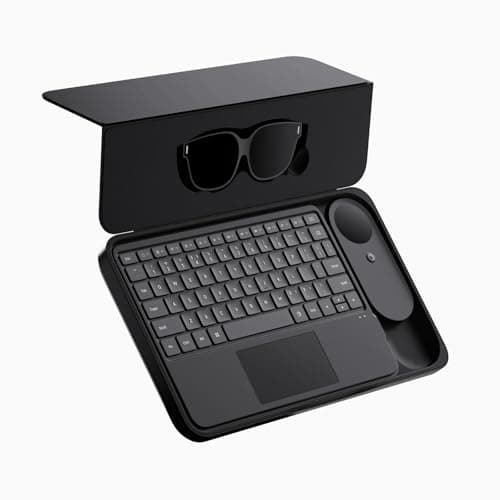
Prime Delivery • 30-Day ReturnsINAIR 2 Elite Suite| AI Spatial Computer OS| AR Glasses + Pod + Keyboard| Compatible with Vast Android apps| 6-Screen Expansion| Wireless PC Streaming| 3DoF Spatial Hovering| Real‑Time 2D‑to‑3D
Free Shipping
2-Year Warranty
30-Day Returns
Key Features
[Multi-Screen Spatial Desktop]: The INAIR Pod’s native 3D spatial OS lets you open up to six windows at once and switch seamlessly between 3DoF Hover Mode (fixed in space) and 0DoF Follow Mode (moves with you). Drag, resize, and rotate each window so documents, browsers, and streaming services remain visible together.
[Vast Android App Ecosystem]: A full Android environment runs directly on the Pod. Install popular productivity, media-streaming, and social apps with a single tap. Arrange them side by side in AR to check email, watch a movie, and reference web content simultaneously—no split-screen required.
[Real-Time 2D-to-3D Spatial Rendering]: INAIR’s AI spatial engine performs depth inference and 3D reconstruction on any image or video, transforming flat content into immersive stereoscopic visuals for richer viewing. Easily upload your own photos and videos from your gallery to convert personal memories into stunning 3D experiences, or activate the 3D enhancer to instantly transform content from popular streaming platforms into a dynamic, depth-filled spectacle.
[Remote PC Streaming Across Networks]: The dual-channel wireless engine mirrors Windows or macOS desktops onto a 135-inch virtual display, whether you’re on the same Wi-Fi or halfway across the world. Leave your laptop behind and securely access your remote computer to run powerful desktop applications and access your files from anywhere, at any time.
[Note]: Due to limitations from different regional carrier environments, remote cross-network streaming may not be supported on certain carrier networks in specific areas. If you encounter the same issue, you can try switching to another carrier network. Our R&D team is also working on adapting to networks in different regions, and remote streaming will become more widely supported in the future.
No description available for this product.
These factors represent the most critical aspects that will impact your satisfaction with this product.