Key Specifications
IIWEY
4.5
2222 reviewsBuy at Amazon Prime Delivery • 30-Day Returns
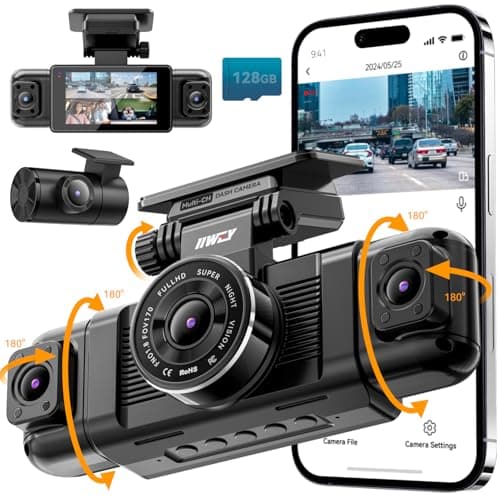
Prime Delivery • 30-Day ReturnsIIWEY N5 4 Channel Dash Cam 360° View, 1080P Front and Rear Inside, Left Right Dash Camera for Cars, 8 IR Lamps Night Vision, 5G WiFi & APP Control, G-Sensor, Parking Mode, with a Free 128GB SD Card
Free Shipping
2-Year Warranty
30-Day Returns
Key Features
❗❗❗NOTE: This product must be powered by the original cigarette lighter charger; it cannot be powered by a USB cable or a Type-C cable. IIWEY N5 dash cam equipped with a 3" IPS screen, FHD 1080P+1080P+1080P+1080P, which can record 360° all-round including front, rear, sides, and interior. It also features a 2.5K+1080P+1080P+1080P mode for diverse needs. In addition, N5 is equipped with 170° super wide-angle front and rear cameras and 150° wide-angle side cameras, providing a wide field of view.
❗❗❗NOTE: N5 dash cam DON'T HAVE GPS and DON'T SUPPORT OBD connection. The 128GB SD card has been installed in the card slot. It connects to your cellphone via built-in WiFi, no Bluetooth. The rear camera must be wired and connected to the front camera for use. It uses a super-capacitor instead of a battery, so please keep the dash cam connected to a power source while in use, we recommend to use the included car charger, or you can use our HARDWIRE KIT (ASIN B0DHJNRPB9, sold separately).
【Loop Recording & Free 128GB SD Card】N5 Dashcam comes with a 128GB Micro-SD card. (supports up to 256GB) Loop recording will start immediately once you turn on the engine. No seconds will be missing. The video will be saved in segments, and the storage space will be automatically detected. When memory is full, the earliest recorded video will be automatically deleted to achieve seamless loop recording.
【5GHz WiFi & Free App Control】❗❗❗NOTE: There are currently two free apps available: iiwey and viidure. We currently recommend viidure. You can find both apps on the Google Play Store and the Apple Store. The N5 dashcam boasts built-in 5GHz WiFi for 4x faster connectivity than 2.4GHz (with 2.4GHz support). It pairs with a free app for Android or iOS, enabling seamless control, video preview, download, and sharing.
【WiFi Using Note】Please note that each time you want to connect the APP to the dash cam, you need to long press the " ◀ " button to turn on WiFi before you can connect. ❗❗❗If the WiFi is not connected to the APP for more than 5 minutes, the dash cam will automatically turn off the WiFi function. This measure is to prevent the dash cam from overheating.
No description available for this product.
These factors represent the most critical aspects that will impact your satisfaction with this product.