Key Specifications
 Prime Delivery • 30-Day Returns
SANSUI Gaming Monitor 27" 1440p 260hz/240hz WQHD 2K - Fast IPS 1ms FreeSync Premium 丨DCI-P3 98% 丨sRGB130% 丨HDR10 丨2×DisplayPort 1.4丨2×HDMI2.0 PC Gaming Monitor with Crosshair
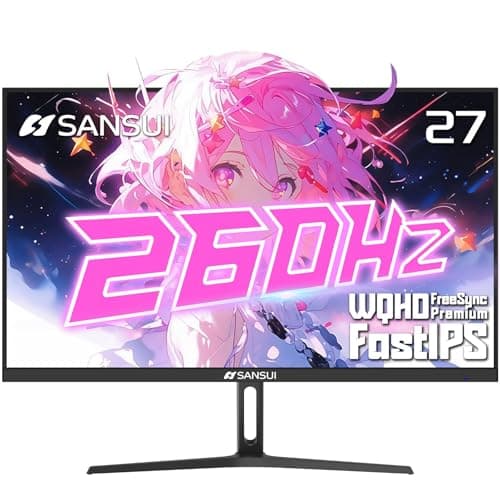
The SANSUI 27-inch 2K 260Hz IPS Gaming Monitor is built for players who want uncompromising speed, clarity, and color accuracy. Offering a stunning WQHD 2560 × 1440 resolution paired with a blazing-fast 260Hz refresh rate and 1ms MPRT response time, this monitor delivers ultra-smooth motion for competitive gaming. Its Fast IPS panel brings vibrant, highly accurate colors with DCI-P3 98% and sRGB 130% coverage, ensuring breathtaking clarity in both games and content creation. Combined with HDR10, FreeSync Premium, low blue light technology, and enhanced gaming tools like Crosshair and FPS/RTS modes, this display is a powerful upgrade for gamers who demand performance and precision.
Key Features
The SANSUI 27-inch 2K 260Hz IPS Gaming Monitor is built for players who want uncompromising speed, clarity, and color accuracy. Offering a stunning WQHD 2560 × 1440 resolution paired with a blazing-fast 260Hz refresh rate and 1ms MPRT response time, this monitor delivers ultra-smooth motion for competitive gaming. Its Fast IPS panel brings vibrant, highly accurate colors with DCI-P3 98% and sRGB 130% coverage, ensuring breathtaking clarity in both games and content creation. Combined with HDR10, FreeSync Premium, low blue light technology, and enhanced gaming tools like Crosshair and FPS/RTS modes, this display is a powerful upgrade for gamers who demand performance and precision.
Key Considerations
✔ Display Quality & Color Accuracy WQHD 2560×1440 resolution offers sharp, detailed visuals ideal for gaming, editing, and multitasking. Fast IPS panel delivers superior color accuracy and wide viewing angles (178°). DCI-P3 98% & sRGB 130% ensures rich colors, lifelike gradients, and excellent graphic performance. HDR10 support enhances brightness and contrast for more cinematic game environments. ✔ High-Speed Gaming Performance 260Hz refresh rate (via DP 1.4) ensures ultra-fluid frames for competitive FPS, racing, and esports titles. 1ms MPRT significantly reduces motion blur and ghosting for razor-sharp fast movements. FreeSync Premium eliminates tearing and reduces latency, offering smooth, responsive gameplay. Game Modes: Crosshair, FPS, RTS, Racing assist optimize visibility and control during intense matches. ✔ Connectivity & Compatibility 2× DisplayPort 1.4 (up to 260Hz) for maximum performance 2× HDMI 2.0 (up to 144Hz) for consoles and secondary devices 3.5mm audio jack for headphones or external speakers Fully compatible with PC, PlayStation, Xbox, and more. ✔ Design & Ergonomics Tilt adjustable (-5° to 20°) for comfortable viewing angles Matte anti-glare screen improves clarity in bright rooms VESA mountable (100 × 100mm) allowing monitor arm or wall installation Slim, modern design fits gaming rooms, work setups, and editing stations. ✔ Additional Features Low blue light & anti-flicker technology for eye comfort High brightness 320 nits for clear daytime viewing Includes DisplayPort cable, power adapter, stand, and user manual 30-day money-back + lifetime technical support
This monitor stands out because it blends speed, clarity, and color excellence in one package. The 260Hz refresh rate and 1ms MPRT drive ultra-smooth gameplay without lag, while the Fast IPS panel ensures vibrant color accuracy suitable for both gaming and creative tasks. With FreeSync Premium, HDR10, and game assist features like Crosshair and FPS/RTS modes, players get enhanced visibility and responsiveness. Its 1440p resolution strikes the perfect balance between performance and visual richness, making this monitor a top choice for competitive gamers, streamers, and users who demand sharp detail with high refresh rates.
These factors represent the most critical aspects that will impact your satisfaction with this product.
Customer Reviews
Packaging is high quality and ease of set up gets you using the monitor in minutes. Efficient connection options all located for optimal set up. Picture is crisp and color saturation is very good at this price point. Highly recommend.
Great Product. Take time to calibrate your monitor settings before use. Go through the Full Menu, Picture Mode, Cross Hair options etc (Small button on the back of the Monitor, and your computer's display settings.)